Odin, for partner practices

The EMR comes with the partnership.

Odin is the clinical platform we built to run our own practice. Partners get it with managed intake, a patient app and the team behind them. No second system to license, learn or keep in sync.

  • No license fee
  • In-person and telehealth
  • AI-ready
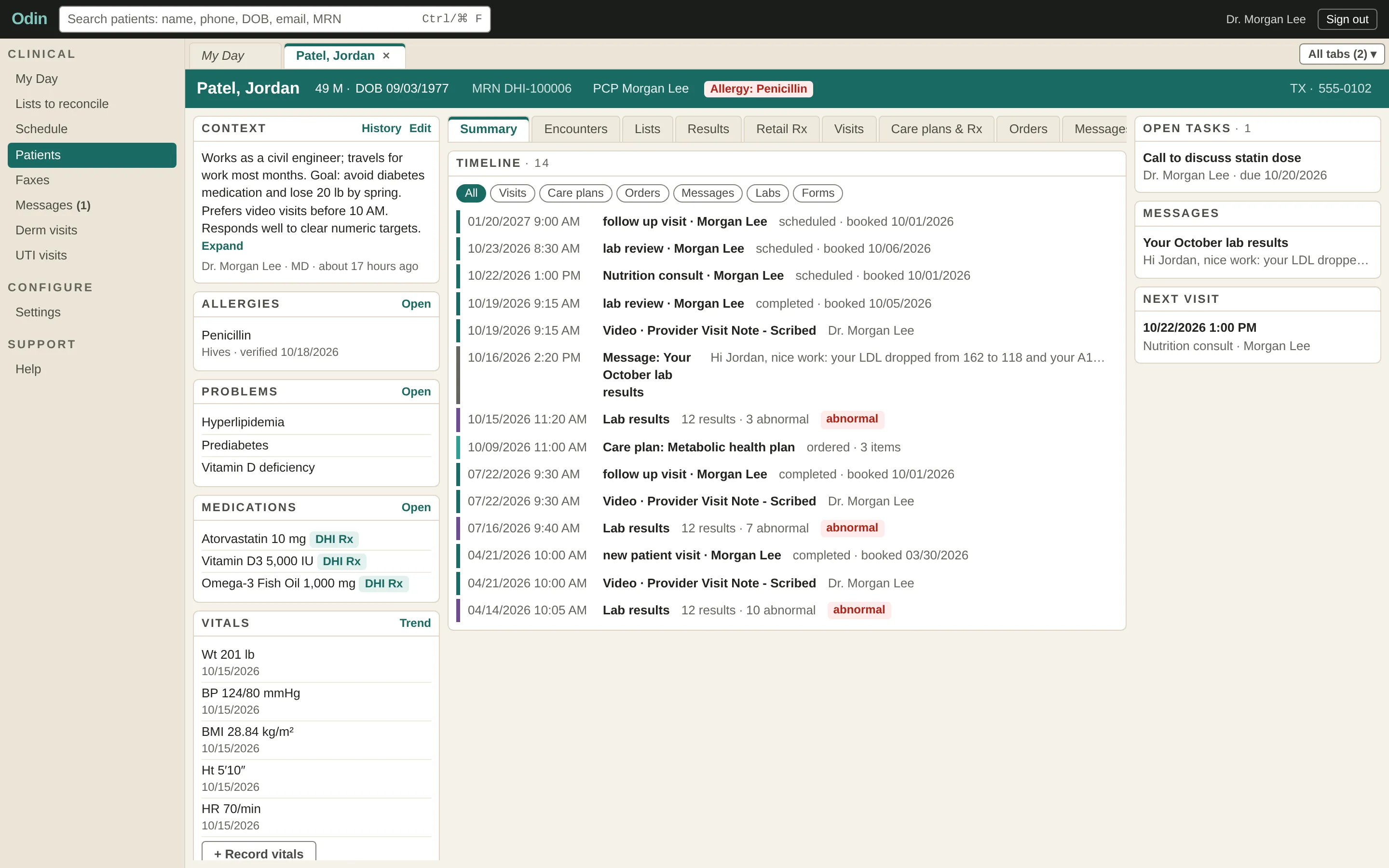
An Odin patient chart: allergies, problems, medications and vitals beside a visit and lab timeline.
DirectTrust certificate: E-Prescribing of Controlled Substances Aggregator

Certified by DirectTrust for e-prescribing of controlled substances.

Verify the certificate on Credly

Why partners stop paying twice

You do not need a second EMR.

Most partnerships mean two systems and staff copying between them. With Odin there is one.

  • No license to buy

    Odin comes with the partnership. No seats, no setup fees, no renewals.

  • One record

    Your team and ours work in the same chart. Nothing is entered twice.

  • Ready on day one

    Intake, labs, scheduling, messaging, telehealth and the patient app already work together.

Managed intake funnels

We run the front door, the way we run our own.

Our own programs run on funnels we built and operate end to end. Partners get the same machinery under their own brand.

  1. Branded intake

    Under your name, designed for the phone your patients arrive on.

  2. Payment built in

    Collected at the right step, so care never stalls on billing.

  3. Labs and review

    Orders, results and clinician sign-off, routed automatically.

  4. Self-booked follow-up

    Patients book their next visit themselves, with reminders handled for you.

Funnels we have built

  • Functional Medicine. Intake, labs, results and a follow-up visit, end to end.
  • Asynchronous dermatology. Photo-based care, no appointment needed.
  • Asynchronous UTI care. A fast guided intake, straight to a clinician.
In-person and telehealth

Built for practices that care how the work flows.

One platform runs the front desk and the video visit, with the busywork automated so your staff stay with patients.

In the clinic

  • Walk-in and kiosk intake
  • Front-desk scheduling
  • Digital fax inbox
  • A results queue for sign-off

Virtual

  • Fully integrated telehealth video visits
  • On-demand scribing
  • Patients join from the app
  • Asynchronous visits, no slot needed
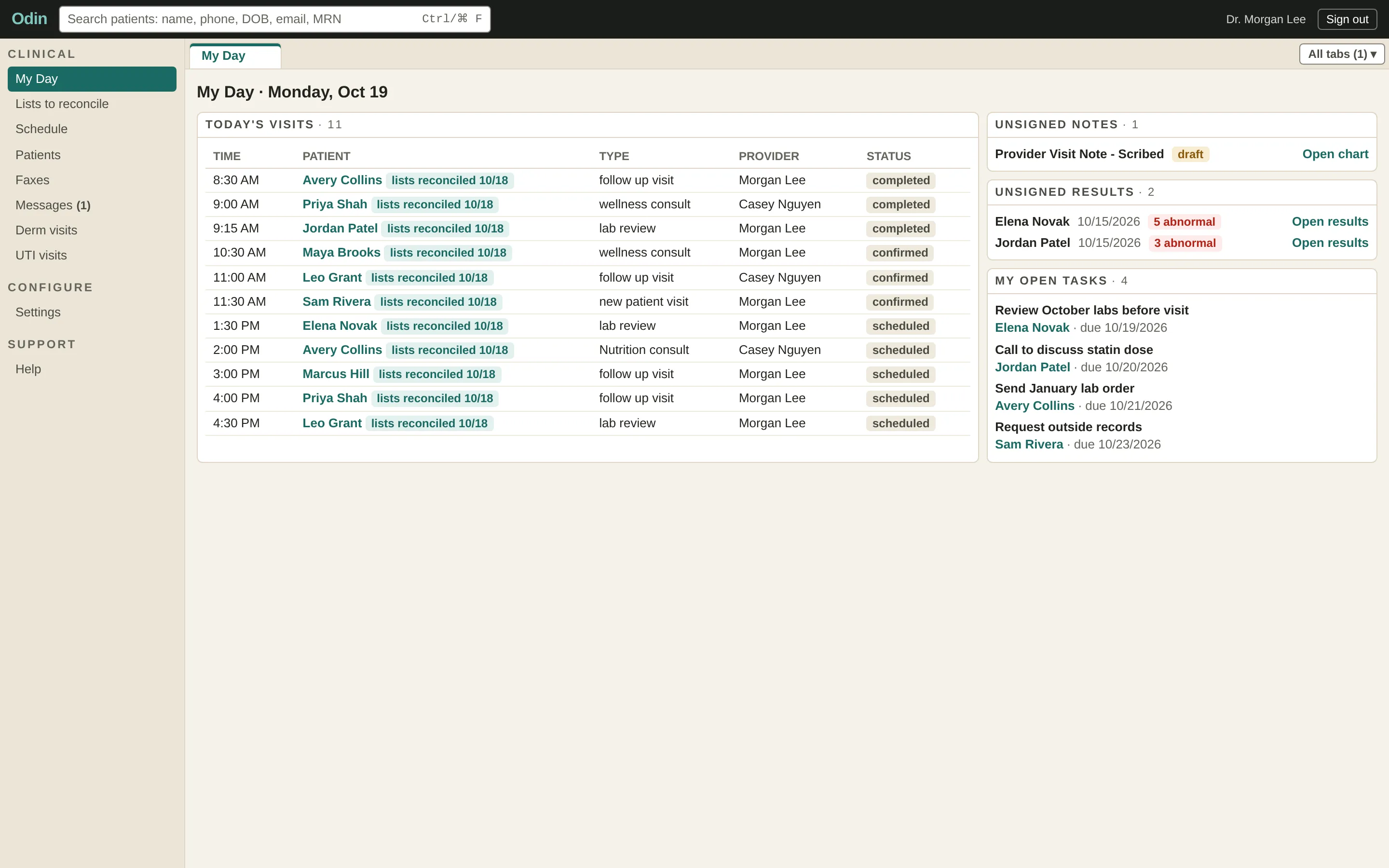
Odin's My Day view: today's in-person and video visits, unsigned notes, results waiting for review and open tasks.
My Day: the whole clinic day, in person and on video, on one screen.
What is in Odin

Everything a clinic charts, in one place.

  • One chart

    Every visit, lab, document and message in a single timeline.

  • Built for speed

    A personal day view, patient tabs and instant search.

  • Smarter notes

    Templates, smart fields and co-signing, with signed notes locked.

  • A results workflow

    Nothing waits unsigned. Every result is reviewed and recorded.

  • Scheduling and messaging

    Booking, calendars and secure patient messages, inside the chart.

  • Integrated telehealth

    Video visits with on-demand scribing, one click from the chart.

  • Intake in the chart

    What the patient told you is there before the visit starts.

  • Security by default

    Microsoft sign-in, a privacy screen and full access auditing.

  • Your own workspace

    Your staff, your patients, your templates and providers.

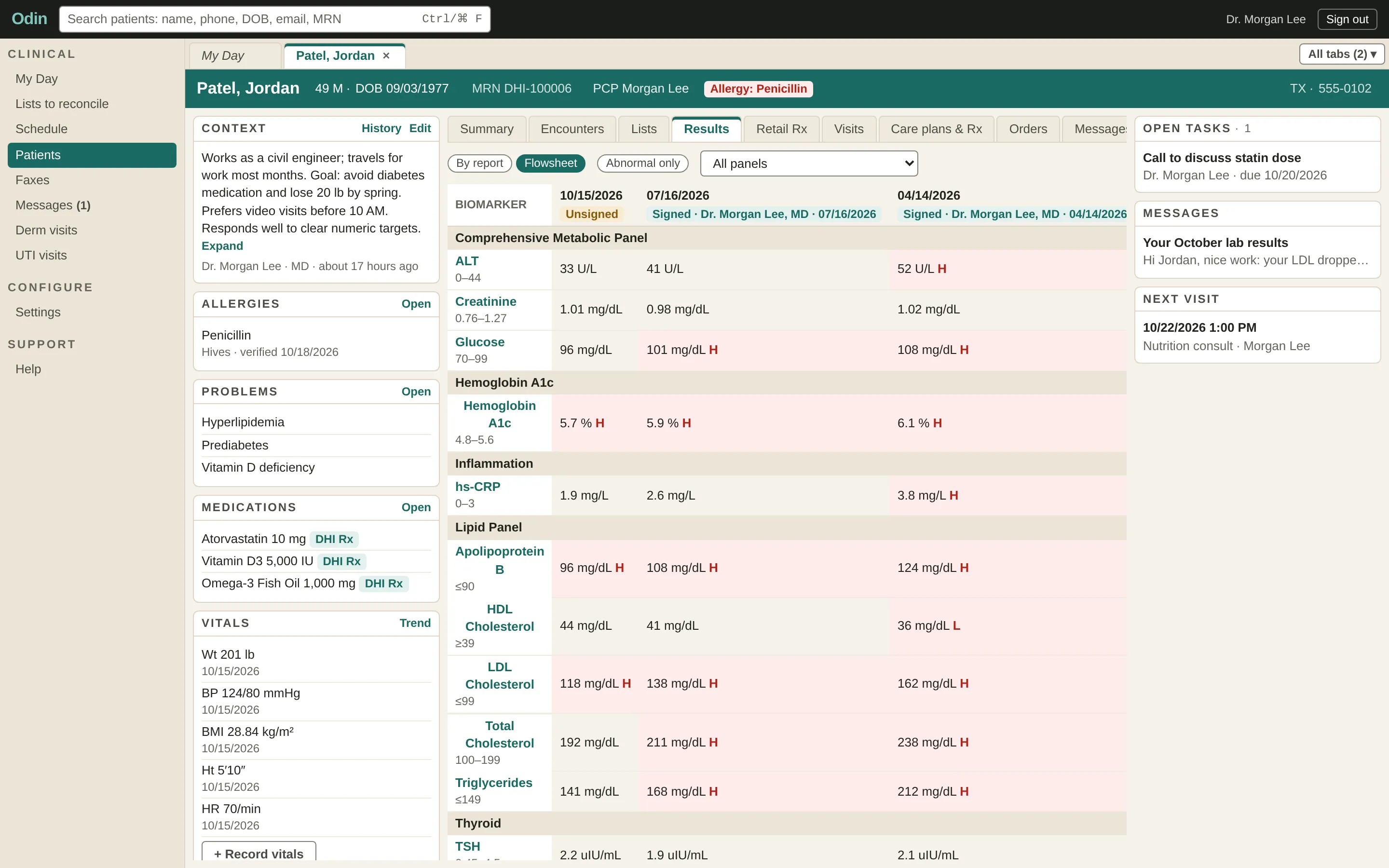
A lab flowsheet in Odin: three draws side by side with flagged values and the lab's reference ranges.
Results over time, with every flagged value and its lab range.
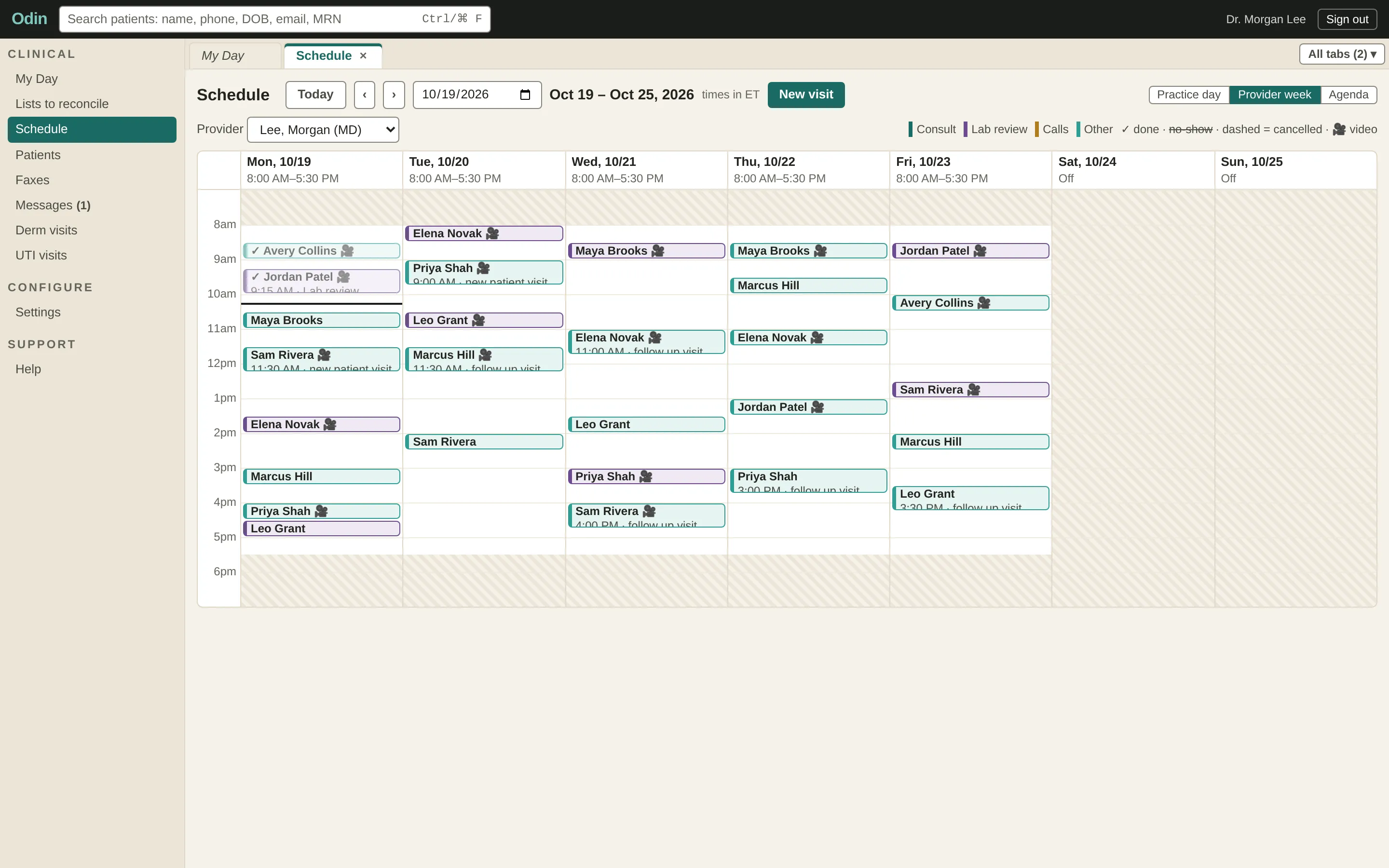
A provider's week in Odin's schedule, with in-person and video visits colour-coded by type.
Scheduling against real provider hours.
The agentic clinical environment

Ask Odin in plain language. Verify every step.

What is an agentic clinical environment?

A workspace where a clinician asks for what they need in plain language, and an agent does the legwork across the chart, labs, schedule and messages. It works inside the same permissions the clinician has, and it shows its work instead of asking to be trusted.

What is a harness?

The rules and checks wrapped around the agent. The model proposes; the harness decides what it is allowed to read, what evidence it must show, and where a clinician has to approve before anything moves. Ours is built for clinical work, so the hard parts are not left to the model.

  • Read before write

    The agent gathers and shows. Nothing changes until someone approves it.

  • Evidence before claims

    Every answer links back to the record it came from.

  • A human at every step

    Scope, results and actions each wait for a clinician to confirm.

odin · agent session
Show me my patients whose labs came back flagged in the last week.
  1. [01] Confirm the question

    agent
    Restates it precisely: results received in the last 7 days, any marker the lab flagged high or low, your patients only.
    harness
    Turns the request into a read-only search. Nothing can be edited at this stage.
    ✓ clinician
    You confirm or adjust the scope before anything runs.
  2. [02] Gather the results

    agent
    Returns 12 patients with 19 flagged markers, sorted by how far each sits outside the lab range.
    harness
    Searches only charts you are allowed to see, and logs every record it opens.
    ✓ clinician
    You see the list with the count and the exact filters used.
  3. [03] Show the evidence

    agent
    Links each row to the lab's own report, the flagged value and the lab's reference range.
    harness
    Refuses to show a number it cannot trace to a source document.
    ✓ clinician
    You open any row and check it against the report.
  4. [04] Act on it

    agent
    On request, drafts follow-up messages for the four patients you pick.
    harness
    Holds every draft. Nothing reaches a patient without approval.
    ✓ clinician
    You edit and approve each message, one by one.
Draft the note for my 2:30 video visit.
  1. [01] Listen

    agent
    Works from the visit transcript, the chart and the intake answers.
    harness
    Uses only this patient, this visit and what the clinician can already see.
    ✓ clinician
    You choose the note template and start the draft.
  2. [02] Draft with sources

    agent
    Writes the note and ties each statement to the moment in the visit it came from.
    harness
    Marks anything it cannot support for verification instead of guessing.
    ✓ clinician
    You review the draft against the highlighted sources.
  3. [03] Resolve every flag

    agent
    Lists each item still marked to verify.
    harness
    Blocks signing while a single flag is open.
    ✓ clinician
    You accept, correct or remove each one.
  4. [04] Sign

    agent
    Hands the finished note back to you.
    harness
    Locks the signed note; later changes become addenda.
    ✓ clinician
    You sign. The note is yours.
Move my Thursday afternoon patients to Friday and let them know.
  1. [01] Plan

    agent
    Finds your five Thursday afternoon visits and proposes Friday times from your real availability.
    harness
    Checks every proposed slot for conflicts and visit length before showing it.
    ✓ clinician
    You review the plan and swap any slot you do not like.
  2. [02] Reschedule

    agent
    Moves the approved visits.
    harness
    Changes only the visits in the approved plan, and records who approved it.
    ✓ clinician
    You approve the plan as a whole before anything moves.
  3. [03] Tell the patients

    agent
    Drafts a short, friendly notice for each patient with the new time.
    harness
    Holds the messages and checks each patient can be reached on that channel.
    ✓ clinician
    You approve the messages, and only then are they sent.

The Odin platform agent is in development with our own clinicians. On-demand scribing, built on the same harness, is live today.

Built for agents

AI-ready, clinician-led.

Odin was designed from the first line for AI agents, with a clinician confirming everything that reaches the chart.

  • Live

    On-demand scribing

    Fully integrated with telehealth visits and powered by our first-class clinical harness, so every draft is checked for accuracy and backed by evidence a clinician confirms.

  • Built in

    Agent-ready by design

    Structured data and clean interfaces under every screen, so new AI capabilities arrive as updates, not migrations.

  • Built in

    Guardrails first

    Permissioned, audited access for every agent, and a clinician signs anything that reaches the chart.

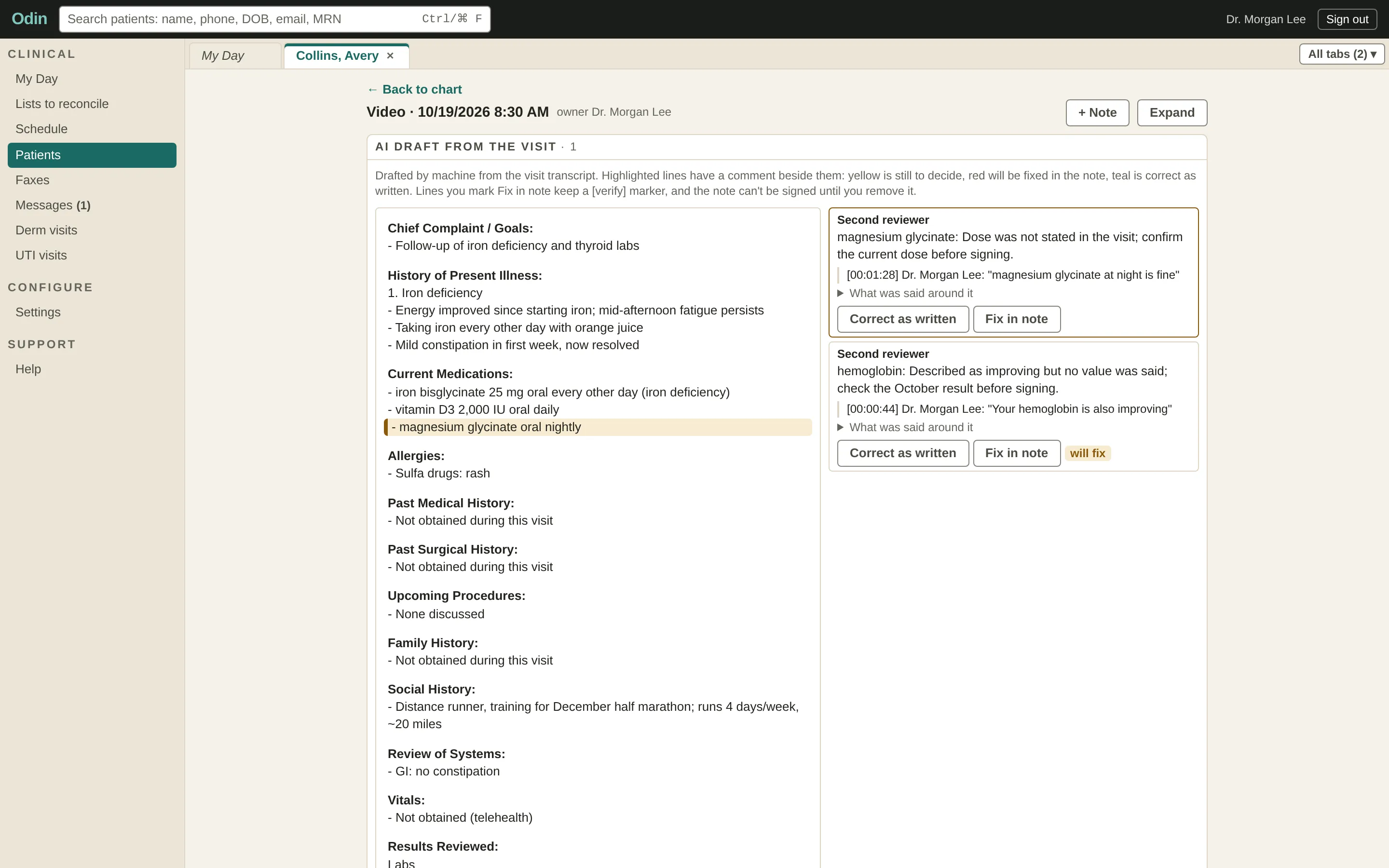
An AI-drafted visit note in Odin with a reviewer's flags beside it, each tied to the moment in the visit it came from.
On-demand scribing: every flag waits for the clinician, and the note cannot be signed until each one is resolved.

And your patients get DynaCare.

The patient app, in sync with the chart: visits, results, messages and bills on iPhone and Android.

See the patient app

Stop paying for a second EMR.

Tell us how your practice runs today, and we will show you Odin in action.

Email the partnerships team

partners@dynamic.club

Notes from the practice

We write about functional medicine and how this practice works.

You can unsubscribe from any message.

Your cart